
NexTurn PLAYTESTING
Log in

Guide

How to run a test that tells you something.

Collecting data is the easy half. This is the other half: what to set up, what to teach your testers, what the report actually answers, and how many plays it takes before any of it means anything.

Set up

0 · Finding playtesting in the app

Playtesting is not a separate app or a website you log into to run a test. It lives inside the NexTurn app you already use to run a game night.

1
Open Settings in the app.Bottom bar, far right.
2
Tap Playtest projects.Every project you own or have joined lives on that one screen. It is the only place in the app where playtest games are visible. They are deliberately kept out of your normal stats, your history and your Rewind.
3
Or open a join link.A link like nexturn://playtest/TEST-4KP2 opens the app straight onto that project. That is what a tester taps in your email or Discord post.
The portal is a different thing, and it is for reading. portal.nexturn.app is where you sit down afterwards with a big screen: insights, the plan, the drill-down, your seats. You cannot run a session from it, and you do not need it to playtest. Everything below happens in the app.

1 · Set up a project

A project is one game under test. Not one session and not one version. The project is the thing that outlives both, and every play, survey and version comparison hangs off it.

What you need before you start. Running a playtest needs a plan (Designer or Studio). That is the one paid part of this, and it is yours, not your testers’. Every plan starts with a 3-month free trial, which is plenty to judge whether the capture is worth paying for. The plan belongs to the project owner; testers use the free app.

THE TWO MINUTES THAT MATTER

1
Name the game.Working titles are fine and expected. An unreleased game has no BoardGameGeek entry, which is exactly why non-catalogue games had to work. The name is what your testers see, so “Gloamhaven (prototype 3)” beats “untitled-2”.
2
Tag its genres.From the same fixed list testers pick their own favourites from. That shared vocabulary is the whole point: it lets the report answer “did this land with people who like this kind of game?” A co-op that tested badly with abstract players told you nothing. The same result from co-op players is a finding.
3
Choose what testers may record.Turn-tracked means NexTurn ran the table, so every turn and phase is timed. Length-only means one phone timed the game: real duration and real flags, no turns. Hand-logged is typed in afterwards, so the length is a recollection. Allow all three unless comparability matters more than volume. A play captured imperfectly beats a play lost because the only permitted mode did not suit the table.

WORTH DOING BEFORE THE FIRST SESSION

4
Create your first ruleset.A ruleset is a named version of the rules: “v0.7”, “post-Essen”. Free text, because you already have a versioning scheme in your head and ours would only disagree with it. Every play is stamped with the one that was active, and without that stamp no version comparison is possible at all. Set one up front even if you never change it.
5
Write your questions, and put them in a survey.Questions live in a pool; surveys are named sets you send. One survey fires automatically after every play (keep it to two or three questions; a question asked ten times gets answered carelessly by the third). The rest you send when you want them, and each one is tracked separately, so “eight answered the check-in but only two answered the exit” is answerable.
6
List your factions, boards and scenarios.If your game is asymmetric, add each axis of variation as a dimension (“Faction”, “Starting board”, “Scenario”) and paste the options in. Say whether each belongs to each player or to the whole table; it changes what the numbers mean. Section 4b covers what comes back.
7
Attach the rulebook and a player aid.A link to wherever the current rules live, plus a short reference card. Both reach every tester’s phone, and a joined guest’s, so the table can check a symbol mid-game without messaging you.

ONLY IF YOU NEED IT

8
Lock the settings.Stops a tester quietly changing round count or turn order. Leave it unlocked early, when you want them experimenting: “three testers all switched to simultaneous turns” is a finding, not a defect. Lock it once a rule is settled, because then a deviation just makes that play incomparable.
9
Point it at a flow.If you have built a NexTurn flow for your game, set it as the project’s active flow and every tester gets it when they start a session. Saving from the project makes a new flow rather than overwriting, so you accumulate a history and comparison stays possible.
You can change all of this later. Config edits reach every tester’s phone on their next sync, and an edit made on a plane lands when you do. The one thing to get right early is the ruleset, because plays are stamped as they happen and cannot be re-stamped afterwards.

2 · Bring in testers

Every project has a join code that looks like TEST-4KP2. Uppercase, four characters, from an alphabet with no letters you can mistake for digits. That code is the whole invitation.

THREE WAYS IN, IN ORDER OF FRICTION

1
Hand out the code.A tester installs NexTurn, opens Settings → Playtest projects, taps Join and types it. Or you send the link and it opens straight onto the project.
2
Invite by name or email.From the project’s People screen. They get a card in their app saying you asked them to test, with your note attached. That beats a code arriving with no context, and it means you get a roster before anyone has played.
3
Let them just sit at the table.Someone who joins the host’s game as a guest is not signed in at all. Their phone gets a code-scoped token for that game and nothing else. The play is still captured and still tagged to your project. Afterwards their app offers them the project, so they can join properly if they want surveys and their own play history. Useful for a convention table or a one-off group you will not see again.
Testers play on the free app. They don’t need Pro or a plan of their own. The paid tier is yours, for running projects. Recorded plays count against your plan, not theirs.

They do sign in (Apple, Google, or an email and a six-digit code, no password) because that is how a play attaches to a person. It is what keeps one tester from seeing another’s notes, and what lets someone answer a survey as themselves rather than as the table. Worth saying plainly when you hand out the code: “it’s free, you just sign in.”
Their plays stay yours, and stay theirs. A playtest game never appears in a tester’s own stats, never syncs to BoardGameGeek, and never touches anything community-wide. That is enforced by how the data is stored, not by a setting anyone can flip.

Testers see only their own notes and plays, never each other’s. Reading someone else’s review first tends to colour your own, and at the sample sizes a playtest runs on, one contaminated opinion is a meaningful fraction of the evidence.

By default a tester can pass the code on. That is usually what you want: the realistic shape of a playtest is you sending five people to five tables, and each of them needs to pull their own group in. If you are running something confidential, switch it off in the project settings. The code still works, you just hand it out yourself.

Removing someone stops future plays, never past ones. You cannot un-know what a play told you, and deleting it would quietly rewrite every version comparison drawn from it. A removed tester also cannot re-enter with the code, so removal is a decision rather than a nudge.

Run the test

3 · At the table

One phone in the middle runs the game, or everyone joins from their own. Either works, and neither needs our devices.

STARTING A PLAYTEST SESSION

1
Start the game from the project, not from New Game.This is the step people miss. A game started the normal way is a normal game: it lands in your stats and the project never sees it. Starting from the project screen is what tags the session, and the tag is what keeps it out of your stats and inside the report.
2
Check the version is right.The active ruleset is stamped on the play as it starts. If you changed the rules this morning and have not made a new ruleset, this play will be filed under the old one, and no comparison later can unpick that.
3
Play the game.That is genuinely it. The phase guide, the turn timer and the scorepad are the same ones you already use; the difference is that the timings are being kept.

THE ONE HABIT WORTH TEACHING

Tap the flag. One tap marks that worked, that didn’t, or rules issue, and it is stamped with the exact turn, round, phase and whose turn it was. Nobody has to stop playing or write anything. We ask for the “why” at the next round break, when the table has already paused.

Tell them to over-tag. The cost of a flag that turns out to be nothing is zero. The cost of the thing everyone forgot by scoring is a revision cycle. Three flags from three different tables in the same stretch is the strongest signal this product produces, and it only exists if people tap.

AT GAME END

Scores go in as they always do. Then the app asks for the few things only the table knows: how it felt, which faction each player had if you listed any, and your after-each-play survey. A tester answering on their own phone answers privately; a single phone in the middle answers for the table, and the report keeps those apart because “12 responses” means something very different if it is three tables rather than twelve people.
Nothing here blocks the save. If a required field is missing the app says so and still lets the play through. A tester who cannot remember their faction should not be losing you the length, the scores, the flags and the survey over one field.
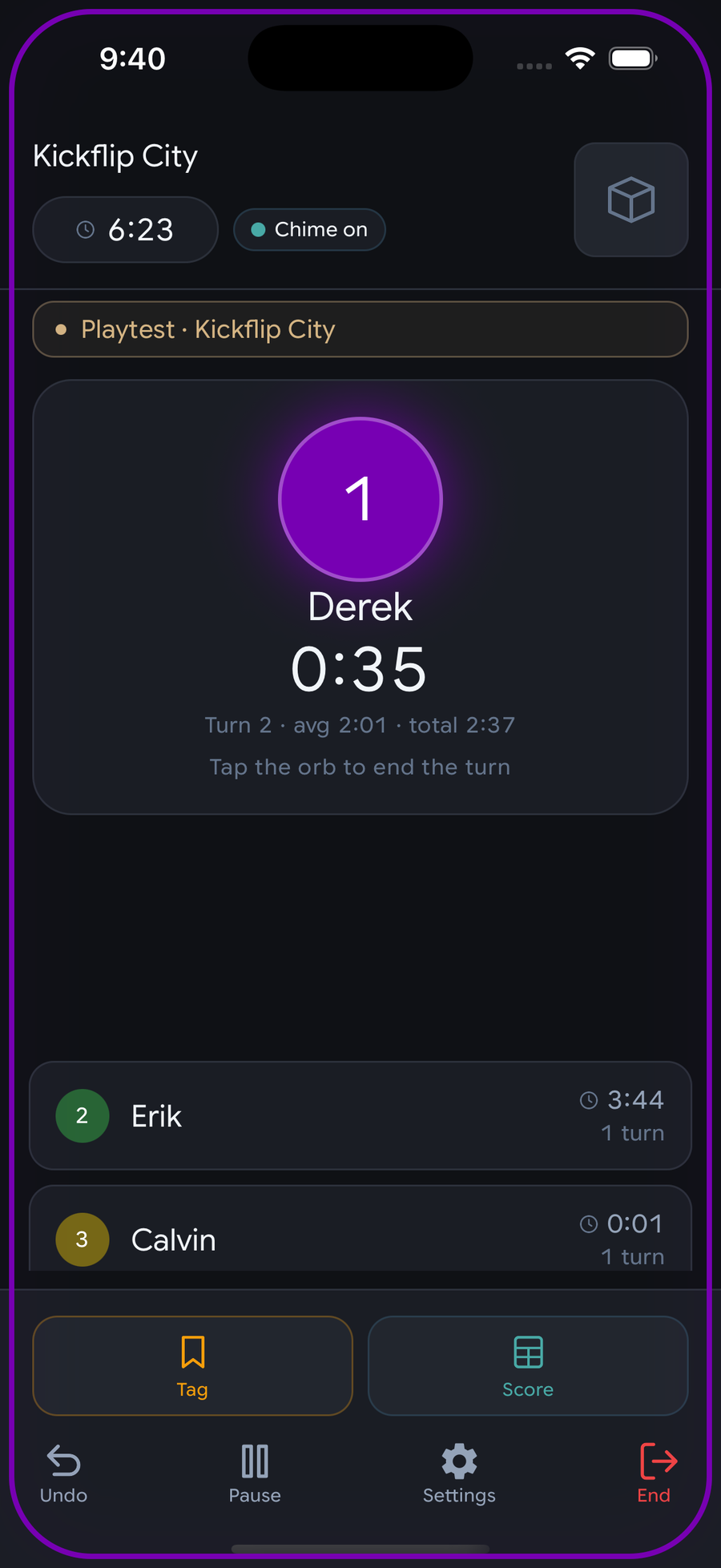
A playtest in progress in the NexTurn app: the current phase and whose turn it is, the running timer, and the flag button testers tap to mark a moment.
A playtest mid-game. The table sees the same screen it always does. The flag is the only addition, and tapping it is the whole job.

Read the results

4 · Reading the report

ChartThe question it answers
Phase share of runtimeWhich part of my game is long, not whether it's long
Turn pace by roundDoes it bog down, and when
Convergent momentsWhere several testers independently noticed the same thing
Experience splitIs it long, or long until you know it
Seat win ratesWhether turn order matters (usually not, at your sample size)
Version compareDid the change do what you wanted
Start with convergent moments, not the charts. Four people flagging the same thirty seconds is the single highest-value thing in the report, and it points at a specific place in a specific phase that you can go and watch.

4b · Factions, boards and scenarios

If you listed variants at setup, the report adds a balance card. It answers two different questions and keeps them apart, because they need different responses from you.

Balance is the one you expected: how each faction did, with the number of plays behind it always printed beside the figure. Coverage is the one designers tell us they didn't know they needed: which of your options nobody has played yet. Four untested factions in a list of eleven is not a balance problem, it's next week's schedule, and no percentage above it can speak for them.

A dash instead of a percentage is deliberate. Under three plays we show the count and no rate. “This faction wins 100%” off a single game is the most persuasive wrong number a report can print, and it is exactly the kind of thing a designer re-costs a card over.

Co-operative games get a different reading, clearly labelled. In a co-op everyone at the table shares one result, so a per-faction win rate computed the normal way isn't a weak signal, it's meaningless. Every faction at a winning table would read 100%. Instead we report “tables that included this one won 3 of 5”, which is a real question, and we never mix it in with a competitive rate.

Ask for what you need; plays still go through. You can mark a dimension as asked-for on every play; the app calls it out at game end when it's missing. It still lets the play through. A tester who can't remember their faction should not be losing you the length, the scores and the survey over one field.

5 · How many plays before it means anything

ClaimPlays neededWhy
Median game length3Length is stable; you'll know it early
Phase share of runtime3Built on hundreds of turns per play
Turn-pace claims8Needs enough rounds across enough tables
Version comparison12 per versionYou're comparing two noisy things
Seat / turn-order advantage~40A 4-player game is a coin flip with four sides
This is why we show progress toward a threshold instead of hiding a caveat. "8 of 12 plays" tells you to book two more sessions. "Version B is faster*" with an asterisk tells you nothing you can act on.

If you take one number away from this page, take ~40. Seat advantage is the claim designers most want to make and least often have the plays to support. A 36% / 14% split across 14 games is exactly what a fair game looks like.

6 · Versions

Label a ruleset before the session that uses it: v0.7, post-Essen, 3.2 cards. Free text, your scheme. Every play is stamped with the label that was current when it ran, so you never have to reconstruct which rules a game used.

Watch for the comparability warning. If the people who played version B had simply played more than the people who played A, that difference is experience, not your rules change. And that's usually the real finding. We'll say so rather than let you read it as a win.

Twelve plays per version is the bar. Below it we'll still show you both columns; we just won't call the difference real.

Good to know

7 · What we won't tell you

We won't tell you something is true when we don't have the plays to back it up. Every number comes with how many games it's built on, and the thin ones say so instead of pretending.

We don't score your game, predict its rating, or tell you whether it's good. We tell you what happened at the tables, with the sample size attached. What it means is your job; you're the designer.

And we don't rank your testers. There is no rating of testers by designers. It would turn volunteers into gig workers and poison exactly the candour the whole thing depends on.

8 · Still stuck?

Reply to any NexTurn email, or use the contact box on our site. It comes straight to us and we read every message. If something in this guide is wrong or unclear, that's the most useful thing you can tell us.

Three months free. Then decide.

Read the guide, then go and get three plays. Three is enough to know how long your game really is.

Start a project